PK power-ups: who won them, who holds them?
The Power-ups card lists in one place the gloves, mist, hammers and other power-ups your viewers have won and are still holding.

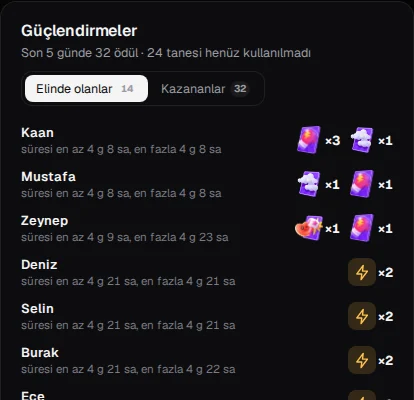
In a PK, power-ups such as a glove, mist or a hammer can change the course of the match. But knowing which of your viewers actually hold them is usually guesswork. The Power-ups card in TTStreamer's live panel gathers the power-ups that TikTok reports in one place. In this article we explain how the card works and how to use it in a PK.
How do power-ups work?
First, a reminder of TikTok's rules, because the card follows them:
- A power-up is won at random.
- A power-up a viewer wins stays in their bag for 5 days.
- It can only be used in the LIVE of the streamer where it was won.
- Its exact type becomes known when it is used.
In other words, a power-up won in your stream only works in your stream. The reverse is also true: a power-up a viewer won in another streamer's LIVE cannot be used in your match. That makes viewers who won power-ups in your stream especially valuable to you.
The Power-ups card: two tabs
The card has two tabs, each showing how many people are in it:
- Winners: viewers who won a power-up in your stream.
- Holding: viewers who have not used their power-up yet and still keep it in their bag.
The Winners tab shows who got lucky. The Holding tab shows who can still make a move in a PK. Because power-ups are valid for 5 days, one won in a stream a few days ago can still appear in today's match.
Which types are listed?
The card covers these power-up types:
- Glove
- Mist
- Hammer
- Time extension
- 1st, 2nd and 3rd place boosts
Under TikTok's rules, the exact type of a power-up may not be known until it is used. So the card does not pretend to know what it cannot know; the type is shown only once it is known.
How to use it in a PK
The card is most useful right before and during a PK. A few practical tips:
- Check the Holding tab before the match. Knowing that viewers holding power-ups are in your stream helps you plan how to approach the match.
- Thank the winners. Mentioning a viewer by name when they win a power-up is an easy way to keep them around.
- Watch the numbers. The counts next to the tabs show how many people won a power-up in your stream and how many still hold one.
- Leave the decision to the viewer. The viewer decides when to use a power-up. You simply remind them of the right moment, for example in the final seconds or when a bonus task opens.
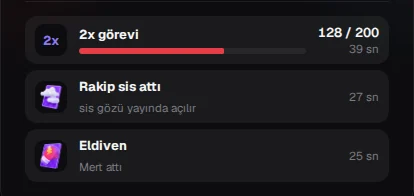
When a power-up is used in the match, the cockpit's mist and glove cards take over, showing who sent it and how many seconds are left. We cover those cards in detail in our PK tasks, mist and glove article.
In short
The Power-ups card makes the hidden side of PK visible: who won what, and who holds what. It works together with the PK layout in the live panel, with nothing extra to set up. TTStreamer is free and never asks for your TikTok password.
If you have not set up yet, our setup guide gets you started in a few minutes.